Here is my RC Car working with my program that I created. What I've done is I've used firmata and processing together so that I can use processing instead of using arduino. Using processing there are so many more advantages than arduino because in processing you can create a screen which you can put images and create so many things. I created a maze with buttons that could control the RC Car. But the maze doesn't work at the moment because I haven't figured out the code to keep the mouse inside the white lines that I made in photoshop. My next step is to get the Right an left functions working a lot better and also get the maze working with the "get()" function in processing.
Enjoy.
My video : http://www.youtube.com/watch?v=1BDOyN72Eog&feature=youtu.be
Showing posts with label MDDN 251. Show all posts
Showing posts with label MDDN 251. Show all posts
Monday, 17 June 2013

My 200 words for Project two.
RC Arduino
I’ve named my project RC Arduino because it’s an RC car
powered by an arduino, go figure. I’ve made a program that can control the RC
Car’s movements with button on the screen. Each button represents a movement for
the Car, so the top button make the car go forward and the left button makes
the car go left so on and so on. The Program has a maze built into it so that
it’s not as simple as you thought with four easy buttons to press but now you
have to navigate your way through the maze to control the car. This project has
almost turned into a game. I have achieved my goals that I’d set for the project,
which was to create a program that could control the RC Car via the computer
and this time I need to make my project more functional and more presentable.
RC Arduino is a functional RC Car that anyone can control and is really fun to
play with, but it has a down side which is my Bluetooth chip didn’t arrive in
the mail yet so now I have to buy an extension cable so my RC Car go move
around more rather than using the standard USB cable.


Thursday, 13 June 2013
update and problems..
Just had my RC Car to work with the program! But could only control the backward and left function on the car... This is an indication of a breadboard problem... Me wiring it up wrong... Also now im getting an error of "NullpointerException". Even though it was working fine before.
Alright just an add on I've fix the NullPointerException now it just wiring the board correctly then getting the maze to work.
Alright just an add on I've fix the NullPointerException now it just wiring the board correctly then getting the maze to work.
Wednesday, 12 June 2013
Update
Here is just an update on my last project for 251. Creating an application to run my Rc Car via a maze in processing.
Im stuck with an error atm :
IllegalAccssError:
Exception in thread "Animation Thread" java.lang.IllegalAccessError: tried to access class processing.core.PApplet$RegisteredMethods from class cc.arduino.Arduino$SerialProxy
at cc.arduino.Arduino$SerialProxy.<init>(Arduino.java:119)
at cc.arduino.Arduino.<init>(Arduino.java:168)
at code2_251.setup(code2_251.java:42)
at processing.core.PApplet.handleDraw(PApplet.java:2117)
at processing.core.PGraphicsJava2D.requestDraw(PGraphicsJava2D.java:193)
at processing.core.PApplet.run(PApplet.java:2020)
at java.lang.Thread.run(Thread.java:680)
But otherwise I have finished the maze: (don'y worry about the erased circle, just did that so it wouldn't show in my application since i've written ellipse in my code. These were just for reference)

Next step is to surpass this error and learn how to use the get() function so I can make the mouse avoid the white walls or stay inside them..
Im stuck with an error atm :
IllegalAccssError:
Exception in thread "Animation Thread" java.lang.IllegalAccessError: tried to access class processing.core.PApplet$RegisteredMethods from class cc.arduino.Arduino$SerialProxy
at cc.arduino.Arduino$SerialProxy.<init>(Arduino.java:119)
at cc.arduino.Arduino.<init>(Arduino.java:168)
at code2_251.setup(code2_251.java:42)
at processing.core.PApplet.handleDraw(PApplet.java:2117)
at processing.core.PGraphicsJava2D.requestDraw(PGraphicsJava2D.java:193)
at processing.core.PApplet.run(PApplet.java:2020)
at java.lang.Thread.run(Thread.java:680)
But otherwise I have finished the maze: (don'y worry about the erased circle, just did that so it wouldn't show in my application since i've written ellipse in my code. These were just for reference)

Next step is to surpass this error and learn how to use the get() function so I can make the mouse avoid the white walls or stay inside them..
Monday, 10 June 2013
trying to hook up RC Car to arduino..
somehow this is confusing me at the moment... hooking up the RC to arduino..
I've come up with 3 methods and only one way works but not the way I want it to.

I've come up with 3 methods and only one way works but not the way I want it to.

Wednesday, 5 June 2013
My background for my program so far..

Sunday, 2 June 2013
My new RC Car.
Here is my upgraded RC Car for project two! This RC Car is still light dependent and the next step is to create a trailer for the RC Car so I can attach the P.O.V device to the back of it. Then have to program the P.O.V to say whatever I want.
Also a link for it working.. : http://www.youtube.com/watch?v=Dw2b5XB8UmY&feature=youtu.be


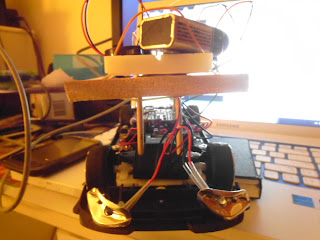

Also a link for it working.. : http://www.youtube.com/watch?v=Dw2b5XB8UmY&feature=youtu.be


Wednesday, 29 May 2013
Introduced to PD
PD means pure data. This program has made me think of multiple more ideas for my project two. My original concept was to control an RC Car via a program on processing. But now there are many more ideas going through my head with this PD program. I could control the speeds of the motor via the program and make a certain shape each time I reach a certain speed. Or something along those lines...
Sunday, 12 May 2013


Saturday, 11 May 2013


Monday, 6 May 2013
Inspiration for p2


At the moment I'm inspired by POV's ( Persistence of vision) wands or wristbands. I like the look of them and was keen to interact this with my Light sensitive RC Car.
Monday, 29 April 2013


Sunday, 28 April 2013
Final video with alarm demo
I have called my project : "The car that ran away"
Link: http://www.youtube.com/watch?v=ZWo5CctgAng&feature=youtu.be
Plus my 3 chosen photos:


Link: http://www.youtube.com/watch?v=ZWo5CctgAng&feature=youtu.be
Plus my 3 chosen photos:


Final adjustments
Here are the final bits in piece for hand in which contains of a PCB and Schematic or my circuit, materials I've used and also a short text on my project :


Added the alarm !
Some of the code for the alarm:
void loop() {
int sensorValue = analogRead(A0);
if (sensorValue > 600) {
analogWrite(3, 100);
delay(1000);
analogWrite(3, 150);
delay(1000);
}
else {
digitalWrite(3, LOW);
}
}
What this is saying is when light is struck upon the LDR (with an intensity of 600+) the alarm will go off but when there is less than 600 the alarm is silent.
The circuit complete with LDR and Alarm:

void loop() {
int sensorValue = analogRead(A0);
if (sensorValue > 600) {
analogWrite(3, 100);
delay(1000);
analogWrite(3, 150);
delay(1000);
}
else {
digitalWrite(3, LOW);
}
}
What this is saying is when light is struck upon the LDR (with an intensity of 600+) the alarm will go off but when there is less than 600 the alarm is silent.
The circuit complete with LDR and Alarm:

Adding LDR plus video
Adding the LDR to the circuit. And little video of it working.
 Here the Video:
http://www.youtube.com/watch?v=6eGZVsVSDGU


http://www.youtube.com/watch?v=6eGZVsVSDGU

Saturday, 27 April 2013
Break through finally!
After 7 STRAIGHT HOURS of playing around with different circuits and soldering a lot of wires to control a DC motor with aurdino, I have finally figured out why they haven't been working! I bought 25 dollars worth of AAA batteries and swapped them with my old ones, then plugged in the forward and back wires from the RC Car to the circuit which is connected to aurdino and now I have a complete controlled via a rotary potentiometer. The next step is to now substitute the rotary potentiometer for a LDR (Light dependent resistor, So that every time light is hit on the LDR current will pass through meaning that my RC Car can power up and start to move forward. This is the action I'm trying to complete with my car running away from the light.
Here is an image to help me add a LDR:

Here are a couple of photos of my step by step process.

Adding a battery to the circuit to power the DC motor, also along with that a transistor that can manage the voltage.

Adding the rotary potentiometer to the circuit.
 Adding a piezo alarm to the circuit so that when light is struck on the LDR the alarm will go off.

And finally a video of it in action and my fritzing version:
This video is using the rotary potentiometer with the DC motor:
http://www.youtube.com/watch?v=3aafWcPBPjA&feature=youtu.be
This allows me to control the speed of the motor from no speed to high speed.
And fritzing view:

Here is an image to help me add a LDR:

Here are a couple of photos of my step by step process.

Adding a battery to the circuit to power the DC motor, also along with that a transistor that can manage the voltage.


And finally a video of it in action and my fritzing version:
This video is using the rotary potentiometer with the DC motor:
http://www.youtube.com/watch?v=3aafWcPBPjA&feature=youtu.be
This allows me to control the speed of the motor from no speed to high speed.
And fritzing view:

update on back up plan

Thursday, 25 April 2013
PIR no work :( So back up plan here we go!
Since I can seem to work the PIR sensor with the arduino, I'm going to my back up plan which is using a light sensor (LDR) to control the forward motion of the RC Car. When the LDR senses light upon it the car will run away from the light and hide in the darkness. When light has struck the LDR an alarm will go off meaning the something is wrong so it has to run away. (If you understand)
Link: http://www.youtube.com/watch?v=kDhAqh1mLc8&feature=youtu.be
 Also I was hoping the PIR I ordered would come before hand in but it hasnt so I have to change my plans up:

Link: http://www.youtube.com/watch?v=kDhAqh1mLc8&feature=youtu.be

Subscribe to:
Posts (Atom)